Let’s fix the clunky software that’s slowing your business
Let’s fix the clunky software that’s slowing your business
We audit your internal software application, show you exactly what’s broken, and give you a visual redesign showing you how to fix it immediately. No 30-page reports.
We audit your internal software application, show you exactly what’s broken, and give you a visual redesign showing you how to fix it immediately. No 30-page reports.
Trusted by Operators across 15 industries. $1M+ in software redesigns delivered.





You invested in Internal software for growth but it’s slowing you down instead.
You invested in Internal software for growth but it’s slowing you down instead.
You invested in Internal software for growth but it’s slowing you down instead.
❌ Everyone just goes back to spreadsheets and workarounds
❌ Your best people get frustrated because the software makes their job harder
❌ Training new employees takes weeks because "only Sarah knows how the system works"
❌ You're paying a developer but the problems never get fixed
If you said yes to 2 or more of these then here's the truth: Your team isn't the problem. Your software wasn't designed for how your team actually work.
Work with uxKraft to get a One screen Usability Redesign
Work with uxKraft to get a One screen Usability Redesign
Work with uxKraft to get a One screen Usability Redesign
Show us how you work over a zoom call
Show us how you work over a zoom call
Before watching your team, we research your industry, review how you make money, and understand your operational bottlenecks. Then during the walkthrough session, we see your software in action and ask questions about how your process works in the real world.
Before watching your team, we research your industry, review how you make money, and understand your operational bottlenecks. Then during the walkthrough session, we see your software in action and ask questions about how your process works in the real world.
We show you where the interface is inefficient
We show you where the interface is inefficient
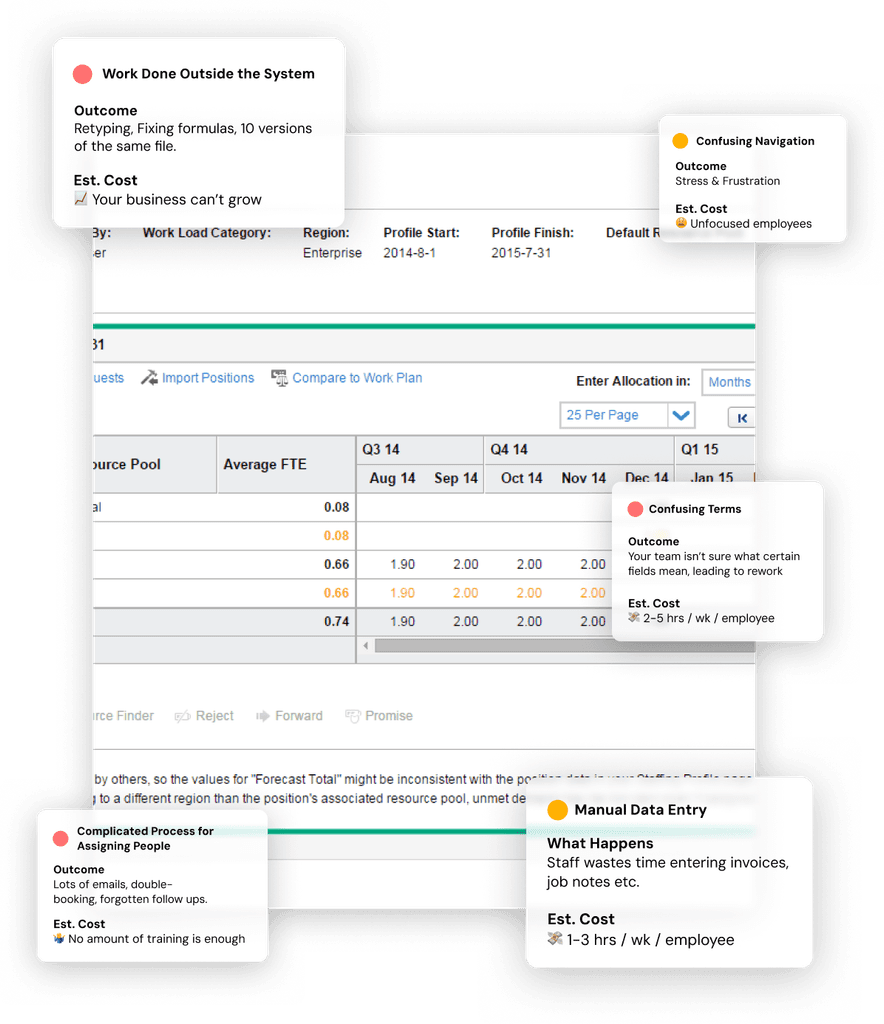
We show you exactly what's broken—right on your actual screens with clear annotations. You'll see what's confusing, what's slow, and why people avoid using it. No technical jargon, just the problems and their business impact.
We show you exactly what's broken—right on your actual screens with clear annotations. You'll see what's confusing, what's slow, and why people avoid using it. No technical jargon, just the problems and their business impact.
You get a redesigned mockup
You get a redesigned mockup
We create a visual mockup design showing how to fix each problem. A blueprint your developer can follow to rearrange the screens—no guessing, no confusion, no endless back-and-forth.
We create a visual mockup design showing how to fix each problem. A blueprint your developer can follow to rearrange the screens—no guessing, no confusion, no endless back-and-forth.
We create a visual mockup design showing how to fix each problem. A blueprint your developer can follow to rearrange the screens—no guessing, no confusion, no endless back-and-forth.
What you walk away with: A Visual Audit (what's broken) and an Implementation Blueprint (how to fix it). Timeline: 1-2 weeks.
Alperen Topay
Alperen Topay
Founder at uxKraft
Founder at uxKraft
You’ve got a business that works — but your software doesn’t.
I've helped a frustrated small business owner turn around software their team was abandoning. Three years later, it's their daily tool for all their teams.
At Johnson & Johnson, I redesigned a 10,000-user internal software system. It scored 90 out of 100 scores in usefulness (the old system was rated at 40 out of 100).
Today I help small business owners redesign slow, clunky tools so their team loves using them.
You’ve got a business that works — but your software doesn’t.
I've helped a frustrated small business owner turn around software their team was abandoning. Three years later, it's their daily tool for all their teams.
At Johnson & Johnson, I redesigned a 10,000-user internal software system. It scored 90 out of 100 scores in usefulness (the old system was rated at 40 out of 100).
Today I help small business owners redesign slow, clunky tools so their team loves using them.
Top 1% Talent | $1M+ in redesigns | 100% job success

Really excellent work... I didn't have super clear requirements, so it probably required your team to flex a little bit of the requirements, definition muscles... but your team did a great job with these screens and properly inferring what a warehouse operation looks like.
Really excellent work... I didn't have super clear requirements, so it probably required your team to flex a little bit of the requirements, definition muscles... but your team did a great job with these screens and properly inferring what a warehouse operation looks like.
Joseph Cochran
Director at Triage Partners
EXCELLENT. Alperen was calm, very thorough in explaining nuances, and most importantly, delivered on their promises. We’ve seen significant impact on defense against claims against our workmanship and labor savings...
EXCELLENT. Alperen was calm, very thorough in explaining nuances, and most importantly, delivered on their promises. We’ve seen significant impact on defense against claims against our workmanship and labor savings...
Michael Furbish
President at Furbish Company
Pricing
Pricing
Pricing
Pick your most frustrating screen. We'll make it efficient.
One Screen Usability Redesign
$1,000
One collaborative live session - we dive deep into how your application is used and to hear your team’s perspective on it.
One Screen Visual Audit - showing you a ranked list of the top 3-5 issues so you understand which issues are worth fixing by business priority - not tech jargon.
Development Mockup - we redesign the one screen to address the issues from the visual audit and give you a sort of “blueprint design” that shows how to change the screen.
All Visual - No 30-page reports or slide decks. No Fluff. Leaving no room for wrong interpretation or misunderstandings
Delivered in 5 business days from kickoff to delivery.
Reserve your spot
Frequently Asked Questions
Frequently Asked Questions
Frequently Asked Questions
How do you figure out what's broken without knowing our business?
I don't go in blind. Before we even start, I ask questions during onboarding: How do you make money? What does your software do? What are your biggest operational bottlenecks? I review your website and research your industry so I understand the context. Then during the walkthrough session, I'm not just watching your team use the software—I'm asking questions about how your business actually works. Why does this step matter? What happens if this goes wrong? What do people do when the system doesn't let them do what they need? The usability problems (confusing screens, too many clicks, unclear labels) are universal. But the solutions need to fit how YOUR business operates. That's what the research is for.
Do you need access to our system?
Yes, but only what's necessary. Usually a demo account or screenshare session with your team member. All work is confidential.
Our system is completely custom. Will this still work?
Custom systems are exactly what I work on. Whether it's built on Salesforce, custom code, or a no-code platform—the usability problems are the same. I've worked with dozens of different tech stacks.
What if our developer doesn't understand the blueprints?
I have extensive experience working with dev teams and I'm familiar with most tech stacks—ReactJS, VueJS, Angular, PowerApps, Salesforce, custom backends, no-code platforms, you name it. During onboarding, I ask about your system's technology and framework so I can tailor the design recommendations accordingly. The blueprints will speak your developer's language. If questions do come up during implementation, I'm available to clarify. But honestly, most developers appreciate getting clear visual instructions instead of vague requirements.
What happens after you deliver the blueprints?
You own them - use them however you need. If your developer has questions during implementation, just email me. I'm available for 30 days after delivery to answer clarification questions and make sure things get built right. You can also book a paid 1-hr consultation and we can problem-solve together. Most teams don't need this because the blueprints are designed to be clear, but you're not on your own if something comes up.
We don't have a developer right now. Can we still do this?
Actually, this is the perfect time to do it. Here's why: When you have clear blueprints before hiring a developer, you can: Interview better - You know exactly what needs to be built, so you can find someone with the right skills Get accurate quotes - Developers can give you real estimates instead of vague ranges when they see exactly what you need Save time and money - The blueprints remove room for interpretation, so you're not paying for back-and-forth or rework Most people hire a developer first, then figure out what to build. That's backwards. Get the design done, then find the right person to implement it. You'll have all the leverage.
How long does this actually take?
1-2 weeks from kickoff to delivery. This includes the observation session, analysis, and creating the blueprints.
What if we need to redesign more than one workflow?
We can discuss multiple workflows, but I recommend starting with one—the most painful one. Fix that first, see the impact, then tackle others if needed.
How do we get started?
Book a free 20-minute call. We'll talk about your system, what's not working, and whether the Usability Redesign makes sense for you.
How do you figure out what's broken without knowing our business?
I don't go in blind. Before we even start, I ask questions during onboarding: How do you make money? What does your software do? What are your biggest operational bottlenecks? I review your website and research your industry so I understand the context. Then during the walkthrough session, I'm not just watching your team use the software—I'm asking questions about how your business actually works. Why does this step matter? What happens if this goes wrong? What do people do when the system doesn't let them do what they need? The usability problems (confusing screens, too many clicks, unclear labels) are universal. But the solutions need to fit how YOUR business operates. That's what the research is for.
Do you need access to our system?
Yes, but only what's necessary. Usually a demo account or screenshare session with your team member. All work is confidential.
Our system is completely custom. Will this still work?
Custom systems are exactly what I work on. Whether it's built on Salesforce, custom code, or a no-code platform—the usability problems are the same. I've worked with dozens of different tech stacks.
What if our developer doesn't understand the blueprints?
I have extensive experience working with dev teams and I'm familiar with most tech stacks—ReactJS, VueJS, Angular, PowerApps, Salesforce, custom backends, no-code platforms, you name it. During onboarding, I ask about your system's technology and framework so I can tailor the design recommendations accordingly. The blueprints will speak your developer's language. If questions do come up during implementation, I'm available to clarify. But honestly, most developers appreciate getting clear visual instructions instead of vague requirements.
What happens after you deliver the blueprints?
You own them - use them however you need. If your developer has questions during implementation, just email me. I'm available for 30 days after delivery to answer clarification questions and make sure things get built right. You can also book a paid 1-hr consultation and we can problem-solve together. Most teams don't need this because the blueprints are designed to be clear, but you're not on your own if something comes up.
We don't have a developer right now. Can we still do this?
Actually, this is the perfect time to do it. Here's why: When you have clear blueprints before hiring a developer, you can: Interview better - You know exactly what needs to be built, so you can find someone with the right skills Get accurate quotes - Developers can give you real estimates instead of vague ranges when they see exactly what you need Save time and money - The blueprints remove room for interpretation, so you're not paying for back-and-forth or rework Most people hire a developer first, then figure out what to build. That's backwards. Get the design done, then find the right person to implement it. You'll have all the leverage.
How long does this actually take?
1-2 weeks from kickoff to delivery. This includes the observation session, analysis, and creating the blueprints.
What if we need to redesign more than one workflow?
We can discuss multiple workflows, but I recommend starting with one—the most painful one. Fix that first, see the impact, then tackle others if needed.
How do we get started?
Book a free 20-minute call. We'll talk about your system, what's not working, and whether the Usability Redesign makes sense for you.